
Chevrolet Spark Owners Manual: Manual Transmission
Caution
Shifting the vehicle initially into any gear other than 1 (First) or R (Reverse) can damage the clutch. Shift the manual transmission in the proper sequence, and time the gear shifting with the accelerator to avoid revving the engine and damaging the clutch.
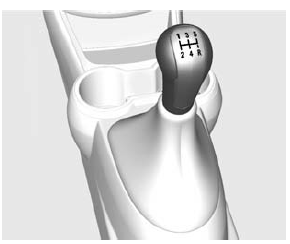
1 (First): Press the clutch pedal and shift into 1 (First). Then, slowly let up on the clutch pedal as you press the accelerator pedal.
If you have come to a complete stop and it is hard to shift into 1 (First), put the shift lever in Neutral and let up on the clutch. Press the clutch pedal back down. Then shift into 1 (First).
2 (Second): Press the clutch pedal as you let up on the accelerator pedal and shift into 2 (Second).
Then, slowly let up on the clutch pedal as you press the accelerator pedal.
3 (Third), 4 (Fourth), and 5 (Fifth): Shift into 3 (Third), 4 (Fourth), and 5 (Fifth) the same way as for 2 (Second). Slowly let up on the clutch pedal as you press the accelerator pedal.
To stop, let up on the accelerator pedal and press the brake pedal.
Just before the vehicle stops, press the clutch pedal and the brake pedal, and shift to Neutral.
Neutral: Use this position when you start or idle the engine.
R (Reverse): To back up, press down the clutch pedal and shift into R (Reverse). Let up on the clutch pedal slowly while pressing the accelerator pedal.
Caution
Shifting to R (Reverse) while the vehicle is moving forward could damage the transmission. The repairs would not be covered by the vehicle warranty. Shift to R (Reverse) only after the vehicle is stopped.
Shift Speeds
Warning
If you skip a gear when downshifting, you could lose control of the vehicle. You could injure yourself or others. Do not shift down more than one gear at a time when downshifting.
Up-Shift Light
 Vehicles equipped with a manual
transmission may have an up-shift light. This light indicates when to shift to the
next higher gear for better fuel economy.
For the best fuel economy, accelerate slowly and shift when the light comes on, and if the weather, road, and traffic conditions allow.
It is normal for the light to go on and off if the accelerator position changes quickly. Ignore the light during downshifts.
 Automatic Transmission
Continuously Variable Transmission (CVT)
The CVT is electronically controlled to produce maximum power and smooth operation.
A display in the instrument cluster indicates the selected range.
P ...
 Brakes
...
Other materials:
Smartphone Link (Overview)
Before Using Smartphone Link
If equipped, the vehicle can connect to Pandora®, Stitcher SmartRadio®, or other
available applications through the infotainment system.
The applications must be downloaded to the device first, then the device can
be connected to the infotainment system.
Pandora i ...
Securing Child Restraints (Front Passenger Seat)
This vehicle has airbags. A rear seat is a safer place to secure a forward-facing
child restraint. See Where to Put the Restraint on page 3-38.
In addition, the vehicle has a passenger sensing system which is designed to
turn off the front outboard passenger frontal airbag and knee airbag under ...
Taillamps, Turn Signal, Stoplamps, and Back-Up Lamps
Stoplamp/Taillamp
Turn Signal Lamp/Taillamp
Back-up Lamp
To replace a taillamp, turn signal lamp, stoplamp, or back-up bulb:
Open the liftgate. See Liftgate on page 2-8.
Remove the two screws and the lamp assembly.
Turn the bulb socket counterclockwise and remove the so ...
