
Chevrolet Spark Owners Manual: Dome Lamps
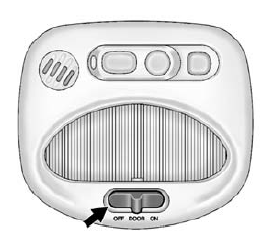
The dome lamp controls are in the overhead console.
Move the control to change the lamp setting.
OFF: Turns the lamps off, even when a door is open.
DOOR: Turns the lamps on automatically when a door is opened.
ON: Turns on the dome lamps.
 Instrument Panel Illumination Control
This feature controls the brightness of the instrument panel controls and infotainment
display screen. The thumbwheel is to the left of the steering column on the instrument
panel.
(Instrume ...

Other materials:
Washer Fluid
What to Use
When windshield washer fluid is needed, be sure to read the manufacturer's instructions
before use. If operating the vehicle in an area where the temperature may fall below
freezing, use a fluid that has sufficient protection against freezing.
Adding Washer Fluid
Open the cap ...
Auxiliary Devices
Using the Auxiliary Input Jack
Settings menus and functions may vary depending on vehicle options.
If equipped, the auxiliary input jack in the center stack can be used to connect
external audio devices such as an iPod®, iPhone®, MP3 player, CD player, and other
supported devices for use as an ...
Tire Pressure Monitor
This vehicle may have a Tire Pressure Monitor System (TPMS).
The low tire pressure warning light
alerts to a significant loss in pressure of one of the vehicle's tires. If the warning
light comes on, stop as soon as possible and inflate the tires to the recommended
pressure shown on the T ...
